
The Rise of Aesthetic Text in 2026 Digital Identity
"Type it once, paste it everywhere." That's the whole philosophy behind cool symbols — unique Unicode characters that stylize an Instagram bio and profile without touching a single design tool. Whether you're hunting for cool symbols copy and paste options or browsing copy and paste pretty symbols to refresh your Instagram bio, the goal is the same: instant visual impact with zero friction.
Here's the beginner's prerequisite nobody explains: symbols are not fonts (learn the mechanics in our Unicode text generator font guide) — read our Unicode text generator font guide for the technical breakdown. Changing a font changes how a character is drawn. A cool symbol is its own character — ✦ is as distinct from a star image as "A" is from "B." That's why a copy and paste symbol aesthetic survives the trip from your clipboard into Instagram, TikTok, or a Discord status, while an uploaded font never would.
The shift from plain emojis to layered symbol combinations happened because creators wanted branding, not decoration. A consistent symbol signature makes a bio recognizable in a scrolling feed — and recognition is what keeps people on your profile.
Essential Categories: Copy and Paste Pretty Symbols for Every Vibe
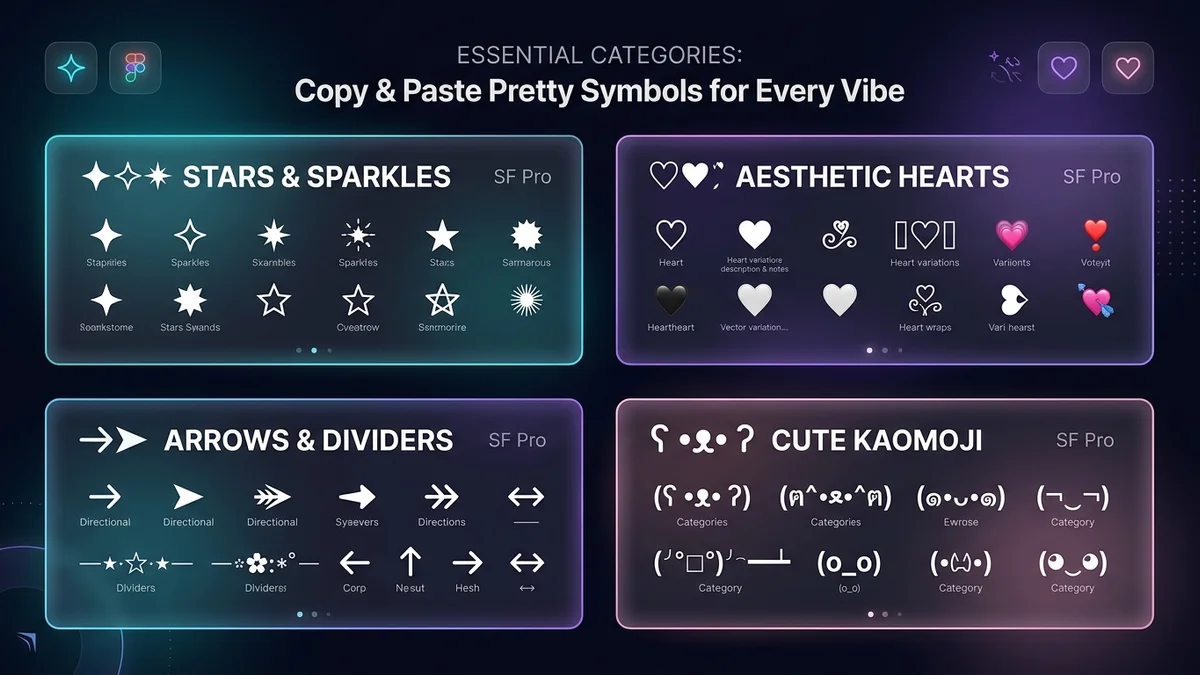
Most high-demand symbols fall into four clusters: stars (★ ✩ ✦ ✧ ⋆), hearts (♡ ♥ ❥ ❦ ღ), arrows (→ ➤ ⇢ ↬ ➵), and sparkles (✧ ✺ ⁺ ˚ ·). When you want to copy and paste pretty symbols into your bio or caption, starting with these four clusters means you can build almost any look without scrolling through hundreds of unfamiliar characters.
Pick by vibe. Minimalist bios use one repeated mark — a single ˚ or · between phrases. Maximalist bios stack contrast: a bracket, a heart, a divider, repeat. Goth and graffiti-leaning profiles reach for crosses (✝ ☨ ♰) and angular glyphs; a cool and symbol pairing like ✦ × ✦ adds edge without clutter. Soft aesthetic profiles lean on rounded hearts and moons (☾ ☽) for a dreamy, delicate look. Knowing your vibe before you browse helps you craft copy-paste Instagram stylish bios and aesthetic captions. makes choosing the right cool symbol fast and intentional.
Quick Copy — practical unit and legal symbols:
</ul>
- © copyright
- ™ trademark
- ® registered
- ° degree
- № number
- ‰ per mille
- § section
Functional Symbols: Brackets, Arrows, and Dividers
Brackets frame. Use them alongside our Instagram VIP bio copypasta symbols to style aesthetic usernames. Wrap your name or niche in ꧁ ꧂ for ornate gaming tags or stylish usernames, 【 】 for bold clean blocks, or 〖 〗 for something between the two. Each pair sends a visual signal before the reader processes a single word.
Arrows direct. Place ➤, ➵, or ⇢ immediately before your link line and the eye follows it down. Cool arrow symbols like these also work as lightweight separators between two short phrases — giving structure without the visual bulk of a full divider.
Dividers separate. Repeat and mirror characters — ⋆。‧˚ʚ♡ɞ˚‧。⋆ or ─── ・ 。゚☆: *.☽ .* :☆゚. ─── — to cut a bio into readable sections. The key mechanic is symmetry: anchor a central icon (a heart, star, or moon) and mirror identical characters outward on both sides. Here is a ready-to-copy divider style to get started:
Each divider functions as a cool bio symbol that breaks a wall of text into scannable chunks — making it easier for a visitor to find your link, tagline, or category at a glance. Copy any of these directly and adjust the central icon to match the aesthetic you built with your bracket and arrow choices above.
- Soft aesthetic: ·͙*̩̩͙˚̩̥̩̥*̩̩̥͙ ✩ *̩̩̥͙˚̩̥̩̥*̩̩͙·͙
Technical Deep Dive: How Symbols and Alt Codes Work
The Unicode Standard is a shared mapping system that assigns every character — including cool unicode symbols — a permanent numerical code point. Your device looks up that code, finds a matching shape in an installed font, and draws it. That's the entire mechanism, which is why a cool symbol travels across apps that share nothing else.
Windows with a numpad: hold `Alt`, type the decimal code on the number pad, release. Alt + 3 gives ♥.
Mac: press `Control + Command + Space` to open the Character Viewer, search by name, double-click to insert.
Mobile: there is no keyboard shortcut. The clipboard is the shortcut — tap, copy, paste.
Empty Box Syndrome: when you see □ or ?, the code point arrived correctly but the device has no font containing that glyph. The text itself is not broken; the renderer simply has nothing to draw.
Mastering Keyboard Shortcuts and Alt Codes
If you're on Windows and want to type cool keyboard symbols without copy-pasting, Alt codes are your fastest shortcut. Hold the Alt key, type the number on your numeric keypad, then release. Here are some worth bookmarking:
These cool keyboard letters and symbols are perfect for bios, usernames, and captions when you want something fast and typeable.
The catch? Most laptops don't ship with a dedicated numeric keypad — and the number row above your letter keys won't trigger Alt codes. They require the separate numpad cluster, full stop.
For beginners without a numpad, skip the guesswork entirely. The Windows Character Map (search it in your Start menu) and the Mac Character Viewer (Edit → Emoji & Symbols) both let you browse, preview, and copy any symbol before you commit to it. You see exactly what you're getting — no invisible-character surprises. That makes them the more reliable starting point for anyone building out their cool keyboard symbol toolkit from scratch.
- Alt + 3 → ♥ (heart)
- Alt + 15 → ☼ (sun/star)
- Alt + 0169 → © (copyright)
- Alt + 0128 → € (euro)
Troubleshooting Symbol Rendering Issues
Older operating systems often ship with older font files, so newer Unicode blocks have no glyph to match and collapse into boxes. Devices also use font fallback — a system behaviour where, when the primary font lacks a glyph for a given Unicode character, the operating system automatically substitutes the nearest available font that does contain it. That's why the same heart symbol looks rounded on an iPhone and flatter on Android: each platform's fallback font is different.
Before publishing your cool symbols copy and paste bio, run through these steps to catch rendering problems early:
- Open a private or incognito browser tab so cached fonts and logged-in styles don't mask issues.
- Paste your bio text into the platform's bio field and save it.
- View your live profile as a logged-out visitor to see exactly what a new follower would see.
- Check the result on at least one additional device or OS if possible, since font fallback behaviour varies between Android, iOS, and desktop environments.
Platform Restrictions and Common Mistakes to Avoid
Gaming platforms restrict symbols for a reason: characters that visually imitate other letters let bad actors spoof an existing username. Discord, Steam, and similar networks strip or reject whole Unicode ranges to keep names uniquely identifiable. If you're hunting for cool symbols for usernames, it's worth checking each platform's character policy before you style your display name — what works on one network may get silently stripped on another.
The bigger trade-off is accessibility. Symbol-heavy text is visually rich and audibly chaotic — screen readers announce characters they cannot name, which turns a decorated sentence into noise for the people using them. This matters whether you're building cool symbols for bios or layering decorative text into a caption: heavy Unicode decoration can lock out followers who rely on assistive technology, so the most effective bios balance visual flair with a readable plain-text core that screen readers can process cleanly.
Then there's over-styling. When a divider is longer than the sentence it divides, followers skim past the whole bio. Decoration should frame your message, never compete with it.
Test checklist: Before publishing any symbol-heavy profile, run through each of the following:
</ul>
- View the profile on an older phone
- Check on both iOS and Android
- Test in the native app and the mobile web version
- Review the profile while logged out
Accessibility Considerations for Screen Readers
When a screen reader encounters a decorative Unicode character, it doesn't skip it — it announces the character's official Unicode name aloud. So a name like "ℳ𝒶𝓇𝒾𝒶" doesn't sound like "Maria"; it sounds like a string of descriptions such as "script capital m," "mathematical script small a," and so on. The more symbol letters you use to replace real letters, the harder your bio becomes to understand for anyone relying on assistive technology.
The practical fix is straightforward: keep actual alphabet letters as letters, and use decorative symbols only as accents or separators — ideally placed at the end of a line rather than woven through readable text.
Generally low-disruption symbols for aesthetic bios:
Using these as end-of-line flourishes or section dividers keeps your bio looking styled without turning it into an audio puzzle for screen reader users.
- ♡ — announced as "white heart suit," brief and unambiguous
- ★ — announced as "black star," widely recognized
- → — announced as "rightwards arrow," reads clearly as a pointer
- · — announced as "middle dot," minimal interruption
Gaming and Username Restrictions
Many competitive platforms block most non-ASCII characters because look-alike glyphs make impersonation trivial — and impersonation in a ranked lobby is a moderation problem, not an aesthetic one.
When a character from the Unicode extended ranges visually resembles a standard Latin letter, two usernames can look identical to a human eye but resolve to completely different character strings. Platforms running automated moderation systems flag these mismatches because they can be used to clone high-reputation accounts or dodge bans tied to a specific username string. That's why the restriction isn't arbitrary — it's a direct response to how spoofing works in practice.
If you want cool symbols for usernames that actually clear the submission filter, focus on characters that sit inside the standard ASCII printable range and have a long history of platform acceptance. Widely accepted safe picks include:
Avoid anything that visually resembles a verified badge, a staff tag, or a system prompt character — those get names flagged fastest and are the least likely to survive a manual moderation review. If you're hunting for cool fonts for gamertags, your safest path is to use stylized ASCII arrangements rather than substituting look-alike Unicode glyphs for standard letters.
- Underscore `_` — the most universally supported separator across PC and console platforms
- Hyphen/dash `-` — accepted on most major gaming networks as a word divider
- Period `.` — works on many platforms, though some restrict it to avoid subdomain-style confusion
- Basic numerals `0–9` — always safe; a reliable way to add personality without Unicode risk
Designing Custom Text Dividers and Layouts
Custom borders come from repetition and mirroring. Select an anchor symbol, flank it with two lighter marks, then reverse the order on the other side. This is one of the fastest cool design copy and paste techniques for building a polished Instagram caption header without any design tools.
Four copy-paste templates for your next bio or caption:
Template 1 — Sparkle Wave: `✧・゚: *✧・゚:* *:・゚✧*:・゚✧`
Template 2 — Star Divider: `────── ⋆⋅☆⋅⋆ ──────`
Template 3 — Ornate Frame: `꧁ ⚘ ꧂`
Template 4 — Moon and Cloud: `⋆。˚ ☁︎ ˚。⋆。˚☽˚。⋆`
Each of these works as a cool symbols copy and paste drop-in — grab the whole line, paste it above or below your caption text, and you're done.
Test spacing on a phone, not a desktop. Narrow screens compress symbol kerning, and a divider that looks balanced on a laptop can wrap awkwardly mid-pattern on mobile. Paste, save, reload, look.
Kaomoji function differently from standard decorative symbols. A Kaomoji is a text-based emoticon constructed from Unicode characters to represent a face or expression — for example, ฅ^•ﻌ•^ฅ reads as a cat face rather than pure ornament. Because the brain parses it as an expression, it carries more visual weight than any divider symbol. Use one Kaomoji per post, not three, or it overwhelms the rest of your cool design copy and paste layout.
Methodology: How to Evaluate Symbol Spacing
Two key terms shape how symbols line up in your bio. Monospaced characters each occupy an identical fixed width — think of old typewriter fonts where every letter, symbol, or space claims the same horizontal slot. Proportional characters, by contrast, take only as much width as their shape requires, so a narrow `|` and a wide `♦` sit at different sizes. Mix the two in a single divider row and your carefully built layout drifts off center, because the platform renders each character's true width rather than the width you eyeballed in a notes app.
Invisible characters — zero-width or blank Unicode spaces — let you nudge alignment without visible padding. This is how most centered bios actually stay centered.
Common TikTok failures: trailing spaces trimmed on save, line breaks collapsed, and long dividers wrapping to a second line.
- Invisible character tip: Paste a zero-width or blank Unicode space between symbols to shift individual elements left or right by a near-invisible increment. Test in the platform's native composer, not a third-party app, since each environment strips or preserves these characters differently.
Popular Kaomoji and Emoticon Pairings
Kaomoji — Japanese-style text emoticons — are a natural fit alongside cool symbols and fancy text in an Instagram bio. Sorting them by emotion before you pick one keeps the selection fast and the final result intentional.
Happy / Positive
Shrug / Neutral
Animal / Cute
Integration tip: Place one kaomoji per line, after your text rather than inside a phrase, so the fancy text flow stays readable and screen readers encounter the emoticon as a trailing element rather than mid-sentence noise. For cool emoticons copy and paste convenience, pick from a single category that matches your bio's overall vibe — mixing moods reads as cluttered.
The current move is restraint: one minimalist cool emoticon closing the bio, paired with a single symbolic accent like ✦ or ·˚, nothing more.
- `(◕‿◕)` — soft and friendly
- `(^▽^)` — bright, upbeat energy
- `¯\_(ツ)_/¯` — the classic; universally readable as a cool emoticon
- `ʕ •ᴥ• ʔ` — bear; popular in soft-aesthetic bios
- `=^・ω・^=` — cat; pairs cleanly with paw or star symbols
The Bottom Line: Key Takeaways for 2026
</ul>
- Cool symbols copy and paste workflows offer a zero-cost, high-impact way to customize your digital identity — no design software, no upload, no account required.
- These are Unicode characters, not font changes, which is why a cool symbols copy and paste approach works across Instagram, TikTok, Discord, and gaming profiles alike.
- Always test for cross-device compatibility: older phones, iOS, Android, app view, and mobile web can all render copy and paste pretty symbols differently.
- Weigh accessibility honestly — keep real words readable and let fancy symbols decorate the edges rather than replace letters.
- Respect platform rules, especially for usernames, where non-ASCII characters are often rejected outright.
- One-click copy tools beat manual alt codes for managing a large symbol library — the distance between seeing a symbol and using it should be a single tap.
- Pair your symbols with a full bio generator so the header, dividers, and closing line read as one cohesive design instead of four unrelated ideas.
Where to Look Next
To complete your profile aesthetic, read our creator bio strategy guide and update your aesthetic profile picture (DP). For Unicode reference, copy and paste fancy text, and platform-specific guidance means knowing where authoritative information lives. Here are three directions worth bookmarking:
- Unicode Consortium official documentation — Consult this when new character blocks are released; it's the source every device vendor builds from when adding cool unicode symbols and special characters to their platforms.
- Apple and Google developer guidelines — Review these for current emoji and symbol support on their respective platforms, so you know which cool symbols copy and paste reliably across iOS and Android.
- Social network help centers — Check the help center of each platform for its latest username character policy before you commit to a handle built around cool symbols for usernames or aesthetic characters.