
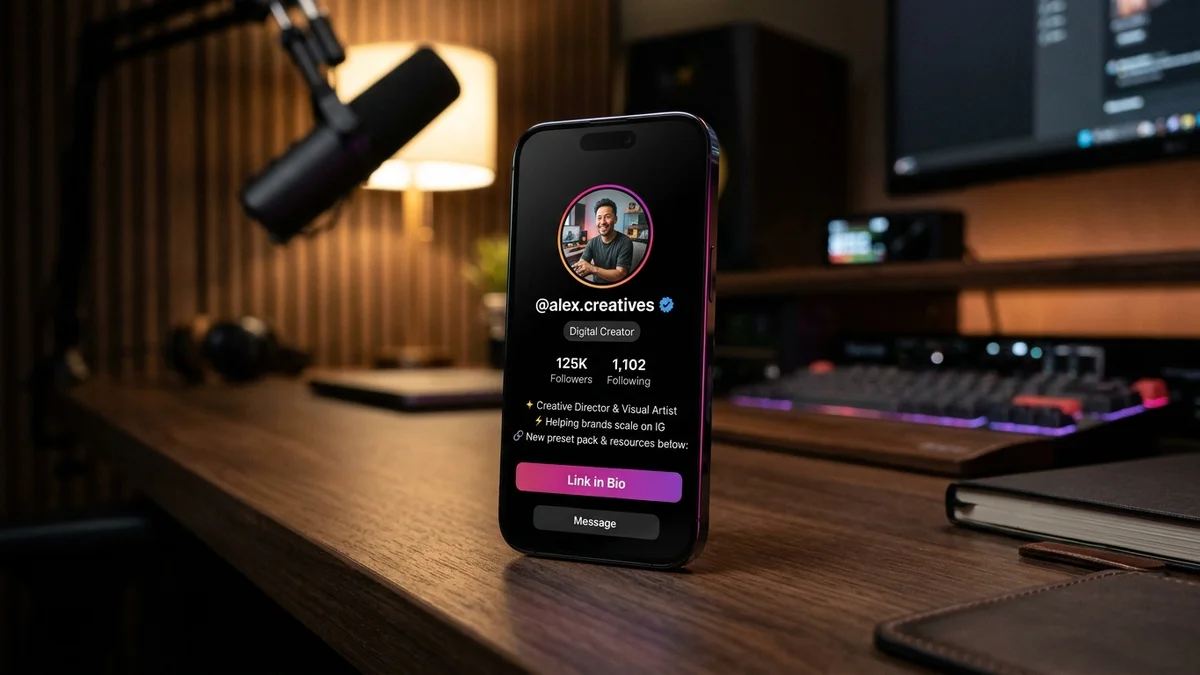
1. The Anatomy of a High-Converting Instagram Bio: The 5-Second Window
Your Instagram bio is the single most valuable piece of real estate on your digital profile. Over 70% of profile visitors make the decision to follow or bounce within just five seconds. Understanding how to write a bio for Instagram means recognizing that your bio is not an autobiography — it is an elevator pitch designed to convert casual viewers into engaged followers.
An effective Instagram bio contains five non-negotiable structural elements: a searchable Name field, an accurate category label, a clear value proposition, verifiable social proof or credibility, and an unmistakable Call to Action (CTA) paired with an active link.
When any of these elements is missing or misplaced, conversion rates drop dramatically. For instance, using your personal name in both the Username and the Name field wastes valuable keyword search volume that could otherwise attract organic discovery in Instagram Explore.
Looking for an instant layout? Use our interactive AI Instagram Bio Generator with Fonts and Live Preview to preview your bio inside an authentic simulated profile card before copying it directly to Instagram.
- Name Field (SEO Anchor): Up to 30 characters of indexed keywords describing your niche or specialty.
- Category Tag: Frees up character space by identifying your industry (e.g., Creator, Digital Creator, Artist).
- Value Proposition: The single sentence explaining the exact benefit or entertainment followers receive.
- Social Proof: High-impact credentials (e.g., '500K+ community', 'Featured in Vogue', '10M+ Reels Views').
- Call to Action (CTA): Explicit directional guidance pointing users down to your primary bio link.
2. The 4-Step Bio Formula: Who, What, Why, and Where to Click
To craft a bio that resonates without exceeding character boundaries, follow our battle-tested 4-step framework. This formula works seamlessly across personal creators, aesthetic curation pages, and digital businesses.
Step 1: Clarify Who You Help & What You Create. Avoid vague proclamations like 'Living life to the fullest.' Instead, state your purpose: 'Sharing daily aesthetic desk setups & productivity workflows' or 'Helping busy founders build organic reach.'
Step 2: Provide Instant Credibility. Social proof eliminates skepticism. If you are an athlete, mention your PRs; if you run a lifestyle account, share your travel milestone. For curated aesthetic accounts, your unique perspective serves as proof.
Step 3: Inject Personality & Tone. Use curated vocabulary or subtle emoji accents to signal your vibe. Explore our collections of Instagram Bio for Girls and Instagram Bio for Boys to see how tone shifts between bold, cool, and minimalist styles.
Step 4: Point Directly to Your Link. Never leave visitors guessing what to do next. Use active verbs such as 'Grab the free preset pack below ↓' or 'Shop the latest drop here ↓'.
3. Character Limits & Line Break Formatting Rules (150 Character Boundary)
Instagram enforces strict limits: exactly 150 characters for the bio description, 30 characters for the Name field, and 30 characters for your handle username. Staying within these limits while maintaining vertical breathing room requires disciplined formatting.
The most common formatting mistake is pressing Enter in mobile notes apps and having Instagram collapse all line breaks into a single cluttered paragraph upon pasting. This happens when invisible trailing whitespace clings to the end of a line.
To guarantee clean, crisp line breaks, ensure there is no space character after the last letter or emoji on each line before pressing Return. Alternatively, use bullet dividers or clean vertical pipes (|) to structure multi-part statements.
Emojis count as two characters each in UTF-16 code units. If you are hovering close to the 150-character limit, replacing two redundant emojis with concise copy can free up space for an extra keyword or link hook.
4. Aesthetic Unicode Fonts & Emojis: Styling Without Hurting Accessibility
Custom Unicode fonts (such as bold serif, cursive script, and small caps) can make your profile stand out instantly. However, excessive styling can backfire by making your bio unreadable to screen readers and certain Android devices.
The golden rule of aesthetic typography is restraint: style your Name field or the first hook line in a custom font, but keep the core informative lines in standard, highly legible system font. This preserves 100% readability while achieving an elevated visual identity.
Avoid using obscure mathematical alphanumeric symbols for essential contact information like email addresses or URLs, as search indexers and accessibility software cannot parse stylized glyphs properly.
5. 50+ Copy-Paste Instagram Bio Templates by Niche
Here is a curated swipe file of high-converting bio templates tailored for different profiles. Simply copy, customize your details, and paste directly into your profile.
For even more attitude-driven or stylish options, browse our dedicated libraries: Instagram Bio for Boys Attitude and Swag Attitude Bio for Girls.
6. Generate Your Perfect Bio with BiosStyle's Free AI Tool
If you want bespoke bios tailored to your exact tone, profession, and aesthetic vibe without manual writing, our smart generator does the heavy lifting in seconds.
The BiosStyle AI Instagram Bio Generator lets you input your niche, pick from 8 distinct style personalities (Aesthetic, Bold, Cool, Professional, Cute, Savage, Minimal, and Romantic), and instantly preview how your new bio looks on an authentic Instagram profile mock-up.
You can toggle between custom Unicode fonts, test line breaks, and copy your favorites to your clipboard with a single tap. Once your bio is set, don't forget to pair it with a standout handle from our curated Instagram Usernames directory and a matching Instagram DP.