
1. The Anatomy of a High-Converting Creator Bio
Someone discovers your profile through a Reel, a hashtag, or a friend's tag. They land on your page and make a decision — follow or leave — in a matter of seconds. The part of your profile that does the most work in that moment is your bio: a short block of text limited to 150 characters.
A "high-converting" bio simply means one that turns visitors into followers, and eventually into engaged audience members or customers. It doesn't waste those 150 characters describing who you are in vague terms. Instead, it answers three plain questions in order: Who are you? What value do you offer? What should they do next?
Skip any of these and a visitor is left guessing — and most won't bother. When you browse ig bio ideas for inspiration, use that three-question structure as your filter. If an example doesn't answer all three, it's incomplete no matter how clever it sounds.
Two elements sit just above your bio text and shape first impressions before anyone reads a word. Your profile picture — whether it's your face or a consistent visual mark — signals recognition and builds trust instantly. Explore our creative Instagram profile picture ideas guide and aesthetic DP downloads to dial in your avatar framing. Your name field is the bold line of text at the top of your profile. It's separate from your username and carries significant weight in Instagram's internal search, meaning the words you place there help people find you. Both elements work alongside your bio text, not independently of it. Getting all three right is what separates a profile that grows from one that stalls.
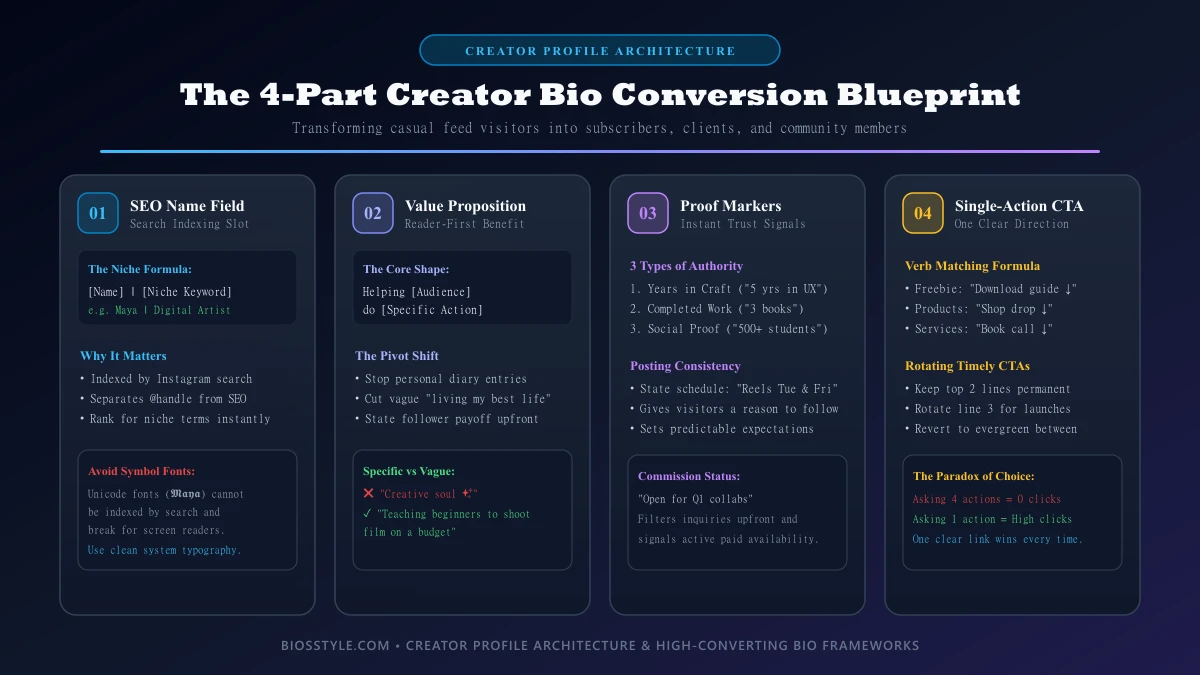
The Strategic Value of the Creator Name Field: Your Instagram profile has two text fields at the top: your username (the @handle in smaller text) and your name field (the bold text displayed just above your bio). They look similar, but they work very differently.
Your username is your address — it's how people tag you and find your profile directly. Your name field is something else entirely: it's one of the main things Instagram reads when deciding whose profiles to show in search results. When someone types "digital artist" or "travel photographer" into Instagram's search bar, the platform scans name fields to find relevant accounts. If your name field just says your first name, you'll only appear when someone searches for you specifically — meaning you're invisible to everyone who doesn't already know you exist.
The fix is straightforward. Use your name field like a short label that describes what you do, not just who you are. A format like Jane Doe | Digital Artist or Marco | Travel Photographer tells Instagram's search exactly what your account is about, so you show up when new audiences go looking. Think of it as the difference between a shop with a name on the door versus a shop with a sign that says what it sells.
Keep it concise. The name field has limited space, so lead with your most important descriptor — your niche, craft, or profession — alongside your name. Skip vague words like "creator" or "content maker" in favor of specific terms your ideal audience would actually search for.
One thing to avoid: decorative fonts made from Unicode symbols (those stylized letter substitutes you sometimes see in bios). They look distinctive, but Instagram's search can't read them as real words. If your name field uses symbol-based text, it effectively disappears from search results. Stick to standard text so the platform — and anyone using a screen reader — can understand it clearly. Consult our mastering text generator font guide and aesthetic cool symbols guide for safe Unicode implementations.
Your name field is a small space with an outsized impact. Treat it as a keyword slot, fill it with terms that describe your work, and you turn a passive profile detail into something that actively brings new followers to your door.
What Is a Value Proposition — and Why Your Bio Needs One: A value proposition is a plain statement of what someone gets from following you. Think of it as a one-sentence answer to the question every new visitor silently asks: "What's in this for me?" Your Instagram bio is where that answer lives. If a visitor can't find it in a few seconds, they scroll on.
The difference between a bio that converts and one that doesn't usually comes down to specificity. Compare these two examples: Vague: "Creative soul ✨ living my best life" vs Specific: "Teaching beginners to shoot film on a budget". The first tells a visitor nothing actionable. The second tells them exactly what they'll get — the subject (film photography), the audience (beginners), and the angle (budget-friendly). That specificity reads as confidence, not as limiting your appeal.
To build your own clear value proposition, swap descriptive adjectives for concrete outcomes and name the audience you're speaking to. The formula is simple: what you do + who it's for. The more precisely you fill in those two blanks, the easier it is for the right people to decide you're worth a follow.
1. Who are you? 2. What value do you offer? 3. What should they do next? If a visitor cannot answer these within 3 seconds, they scroll away.
- Who are you? Give the visitor a clear identity or role.
- What value do you offer? Tell them what they'll get from following you.
- What should they do next? Point them toward one specific action.
2. How a Bio Grows Up: From Personal Diary to Creator Storefront
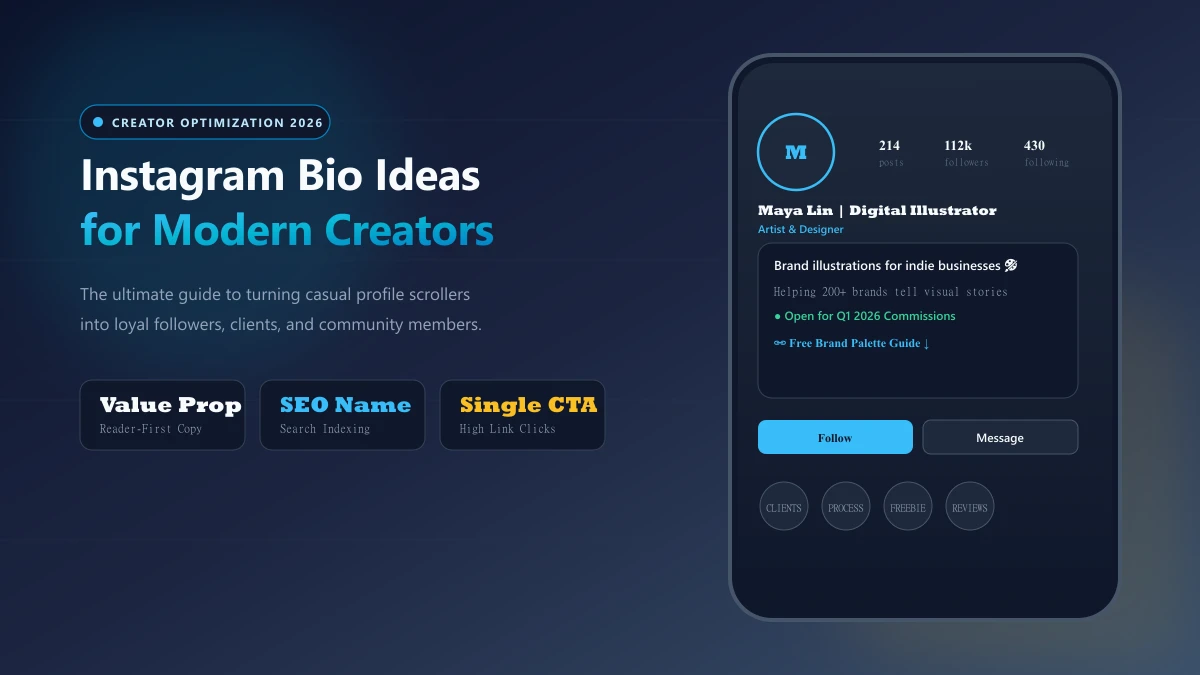
Consider a composite creator — call her Maya, an illustrator who posts sketches between shifts. Her first bio reads like a diary entry: her city, her coffee order, three emojis, a half-sentence about loving art. It feels personal and warm. The problem is that it doesn't tell a visiting stranger anything useful — not what Maya makes, not who she makes it for, not what to do next. Anyone searching for an illustrator to follow or hire would scroll straight past it.
A year later, the same account looks completely different — not because Maya changed, but because she changed what her bio is for. Here's what shifted, one element at a time:
Nothing about Maya's personality disappeared. The voice stayed the same. But the bio stopped describing her and started serving the reader.
That's what "audience-focused" means in plain terms: instead of answering "Who am I?", the bio answers "What can I do for you, and what should you do next?" An audience-focused bio treats every character as a prompt for the reader, not a note to herself.
Stage 1: The Identity-Focused Bio: Most people write their first Instagram bio the same way: hometown, star sign, favorite band, a string of emojis, maybe a lyric that felt meaningful at the time. It's expressive, and that's exactly why it's hard to let go of.
The problem is straightforward. When a stranger lands on your profile, they haven't searched for you by name — they've arrived because a post caught their eye or someone recommended your account. In that moment, they're asking one question: is this profile worth following? Details like your coffee order or birth month don't answer that question. They tell a stranger about you, but not what you offer them.
A bio that lists personal facts is written for yourself. A bio that earns followers is written for the person reading it. Explore our short Instagram bio ideas guide and aesthetic bio ideas guide for concise personality frameworks.
Stage 2: The Service-Oriented Pivot: At some point, a creator's bio needs to stop being about who they are and start being about what they do for their audience. That shift is the service-oriented pivot, and it changes how visitors decide whether to follow.
The sentence template that makes the pivot work: The clearest way to write a service-oriented bio is to follow this shape: "Helping [audience] do [action]."
Break it into two parts: [audience] — name the specific person you're for. Not "everyone" or "people." Think: "beginner photographers," "small business owners," "home cooks on a budget." And [action] — name the result they get. Not what you post, but what they walk away with. Think: "book their first paid client," "grow without running ads," "meal prep in under an hour." Put those two parts together and you have a line that tells the right visitor "this is for me" — and gives everyone else an honest signal that it isn't.
What "niche keywords" means in plain language: A niche keyword is simply a specific word or phrase that describes your corner of a topic. "Photography" is broad. "Wedding photography" is a niche. "Budget wedding photography tips" is narrower still. When you use the specific phrase your audience actually searches for — inside that "Helping [audience] do [action]" line — Instagram's search can match your profile to people typing those words. Using vague language means search has nothing concrete to grab.
What "proof markers" means in plain language: A proof marker is a short, concrete detail that gives a visitor a reason to trust you before they've seen any of your content. It's not a vague claim like "experienced creator." It's a specific signal: Years doing the work ("5 years in brand design"); A finished project or outcome ("launched 3 digital courses"); People you've worked with or taught ("helped 200+ students").
One proof marker — just a few words — does more than a sentence of self-description, because it's specific enough to be verifiable in the reader's mind. Taken together, the template, the niche keyword, and one proof marker give your bio a complete job: attract the right person, tell them what you do, and give them a reason to believe it.
- The name field now states her medium ("Digital Illustrator") instead of just her first name. That's the bold text at the top of every Instagram profile — it's the first thing a visitor reads, so it does the work of saying what Maya actually does.
- The first line names the people she creates for ("Brand illustrations for indie businesses"), not facts about herself. That's the shift from self-description to reader-relevance.
- The last line tells visitors exactly what to do next — view her portfolio, download a freebie, send a message. Without this, visitors have no obvious reason to act.
3. Niche-Specific Bio Templates for 2026 Creators
Templates aren't shortcuts around thinking — they're scaffolding. In this context, that means a ready-made structure you can build on: the information is already arranged in a logical order so you don't have to work that out from scratch. Each structure below presents identity first, value second, and next step last, because that's the sequence a profile visitor naturally follows. Fill in the brackets in your own voice, and the frame disappears behind your words.
A common mistake artists make when writing their bio is spending most of their space on feeling — words like "dreamer," "soul-driven," or "lover of light" — without saying anything about what they make, who it's for, or how someone can work with them. Educators tend to do the opposite: a list of credentials and platforms, but no sense of personality or who they're speaking to. The templates that follow are designed to correct both tendencies.
To use them, replace each bracketed placeholder with a detail only you can supply. That means your specific medium, your posting schedule, your location, your current project — not a generic version of those things. Two creators working from the same template should still read as completely different people. That's what separates a genuinely good Instagram bio from one that just looks borrowed: the structure can be shared, but every specific detail should be yours alone. Browse our complete curated Instagram bios collection for thousands of pre-tested niche options.
Templates for Visual Artists and Designers: Before diving into the templates, it helps to understand one key term: commission status. This simply means whether you're currently available to take on paid creative work from clients. If you're open to commissions, that means someone can contact you to request and purchase custom artwork. If you're closed, you aren't accepting new client work right now.
Structure: Style + Medium + Commission Status + Link.
Stating your commission status does quiet but important work. Most inquiries from potential clients begin with exactly that question — "Are you available?" — so answering it in your bio means visitors get the information they need before they even tap the message button. For you, it filters out requests that don't fit your current availability, so your inbox stays relevant. For the visitor, it removes uncertainty before they invest time reaching out. Both sides save time, and the interaction that does happen starts on the right foot.
Templates for Video Creators and Educators: Structure: Topic + Frequency + Authority Marker + Primary Resource.
An authority marker is a short phrase that tells a visitor why your content is worth their attention. It doesn't have to be a formal credential. In the example above, "learning together" works as an authority marker because it sets a tone — it tells the visitor what kind of creator you are and what kind of community you're building.
Frequency — the "New Reels every Tuesday" part — answers a question every first-time visitor silently asks: will there be more of this? A predictable posting schedule gives someone a concrete reason to follow you rather than just watch once and leave. A one-time viewer has no need to follow you. A viewer who knows new content arrives every Tuesday does. Lead the final line with a verb — Learn, Watch, Join — so the tap feels like a decision already made.
Templates for Lifestyle and Travel Influencers: Structure: Vibe + Location + Current Project + Contact.
Two elements in that template do quiet but important work for beginners: Location does more than describe where you live. Mentioning a city or region in your bio signals to local brands — restaurants, boutique hotels, regional tourism boards — that you're based in their market. That makes you a more relevant partner for campaigns they want to run close to home, and it draws in local followers who feel an immediate connection to someone who shares their city.
"Work with me" is a phrase that tells brand managers, PR contacts, and small business owners that you're open to paid partnerships, gifted collaborations, or sponsored content. If a visitor lands on your profile and wants to hire you, they need to know that option exists. Without it, they may assume you're a hobbyist who doesn't take outside projects. The phrase keeps your personality intact while removing any ambiguity about your availability.
4. Why Your CTA Is the Most Important Line in Your Bio
A call-to-action (CTA) is simply the line in your bio that tells visitors what to do next — tap a link, book a session, download a freebie. It's one sentence or phrase, and it's the moment your bio either converts a visitor into a follower, a client, or a customer — or lets them scroll away.
The challenge is that most bios ask for too much at once. When someone sees four different requests — follow, shop, subscribe, book — they face a small but real mental overhead: which one matters? The more options a person weighs, the more likely they are to choose none of them. Keeping it to one clear ask removes that friction entirely. Pick the single action that serves your biggest goal right now and lead with it. Everything else can wait for next month's bio update.
A link-in-bio tool is a third-party page — separate from Instagram — that lets you list multiple destination links behind one URL, since Instagram only allows a single clickable link in your bio. Tools like these are useful, but they add one extra tap between your visitor and their destination. If your link-in-bio page is a wall of twelve equal buttons, you haven't solved the problem — you've relocated it. Put your primary destination first and make it visually prominent so visitors don't have to hunt.
Match your verb to what you're actually offering: Download (for a free resource or lead magnet); Shop (for a product or merch link); Book (for services or consultations); Read (for a newsletter or blog).
A single arrow emoji (→) or pointing finger (👇) before your link pulls the eye naturally toward the tappable element. One directional cue is a signal; five of them are clutter.
Choosing Your One Primary Action: Start by naming your goal before you write a single word of your CTA. That clarity matters because your bio can really only do one job at a time.
What is "off-platform traffic"? It simply means sending someone away from Instagram entirely — to your newsletter sign-up page, your online shop, your podcast, or any website you own. That's different from actions that keep people on Instagram, like following your account or browsing your tagged posts. The trade-off is real: every visitor who clicks away to your website is a visitor who stops scrolling your feed, which can reduce the in-app engagement Instagram's algorithm notices. That doesn't mean off-platform CTAs are wrong — it means choosing one intentionally, knowing what you're prioritising.
Once you've made that call, commit to a single primary action. Your options generally fall into two camps: actions that keep visitors on Instagram (such as following your account), and actions that send them somewhere you own (such as a newsletter or shop). Pick whichever one matches your current goal. A creator focused on growing reach right now has a different answer than one launching a product next month.
That brings up the most practical piece of advice here: rotate your CTA around specific moments, not vague impulses.
Maximizing the Link-in-Bio Real Estate: Your bio's link is prime real estate — it's the one clickable destination Instagram gives you in your profile. Getting someone to tap it is only half the battle. What happens after the tap matters just as much.
Design for the phone screen: Most of your audience will open your link on a mobile device, and Instagram opens it inside its own built-in browser rather than the visitor's default app. That built-in browser has less screen space and can feel slower than a regular browser. Keep your linked page simple: use large buttons that are easy to tap with a thumb, make sure the page loads quickly, and don't interrupt visitors with a pop-up or sign-up prompt before they've even seen your content.
Match what you promised: The most common reason someone taps your link and immediately leaves is a mismatch between what your bio says and what the page delivers. For example, if your bio says "grab my free template," the link should take visitors directly to that free template — not to your homepage, a pricing page, or an unrelated product. When the page doesn't deliver on the bio's promise, visitors leave within seconds. This is sometimes called a "bounce," meaning they arrived and left without taking any action.
Track your changes: When you update your link or the destination page, make a quick note of what changed and when. That way, if your click-through rate goes up or down, you'll know which version was running and can make smarter decisions going forward.
- Launching a new course in December? Swap in "Enroll now — link below" two weeks before launch and keep it there through the close date.
- Running a holiday sale? Change to "Shop the sale — ends Sunday" for the duration.
- Quiet season between projects? Revert to your evergreen CTA, such as "Sign up for weekly tips."
5. Limitations and Strategic Considerations
A good Instagram bio earns a follow from someone your content already impressed. It cannot rescue a feed with no point of view. If growth is flat and the bio is sharp, the problem lives upstream.
There's a real tension between looking distinctive and being findable. Here's what that means in practice: Decorative fonts are stylized text styles — think swirly, bold, or italic-looking letters — that some creators copy-paste into their bios to make their profile stand out visually. They're created using Unicode symbols, which are special characters that look like letters but are technically images of letters. Because they aren't real text, Instagram's search system can't read them the way it reads normal words, which can make your profile harder to find.
Screen readers are tools used by people with visual impairments to have text read aloud to them. When a screen reader encounters decorative font characters, it reads out the symbol's technical name instead of the word — so "Hello" might be announced as "Mathematical Bold Capital H, Mathematical Bold Capital E..." rather than just "Hello." This makes your bio difficult or impossible to understand for those users.
Heavy symbol dividers and stylized spellings create similar problems. Sometimes brand voice should win — a comedy account whose identity is absurd phrasing shouldn't sand that down for keyword tidiness. The practical fix is to decide which line in your bio is doing the searchable work, keep that one in plain text, and let the others carry the personality.
Before optimizing your bio, here are three core trade-offs explained simply: Standing out vs. being found (unusual spellings vs. search discoverability); Looking stylish vs. being accessible (Unicode fonts vs. screen readers); Showing personality vs. being clear (voice vs. searchable keywords).
The Hidden Cost of Custom Fonts: Those stylised fonts you see in some Instagram bios aren't real fonts at all. They're built from Unicode symbols that happen to look like letters. When you paste text from an online font generator, you're not writing the letter "H"; you're inserting a symbol that resembles one. Search visibility and assistive technology both suffer. If you like the visual effect, the practical middle ground is to apply decorative characters to one ornamental line only and keep your name, niche description, and call to action in standard text.
Frequency of Bio Updates: Your bio has two jobs, and mixing them up is the most common mistake beginners make. The core identity line is the part that stays fixed for months at a time. It answers who you are and who you create for. The flexible last line is where you make timely updates (launches, open slots, new products). Rewriting the whole bio every week helps no one. Keep the core identity stable; keep the last line current.
- Links: Paste your link-in-bio URL into a browser and confirm it opens. A broken link is the most damaging oversight because it silently kills every click you earn.
- Dates and seasons: Search your bio text for any month name, year, or seasonal phrase. "Booking March slots" left in a live profile signals an abandoned account.
- The flexible last line: Ask yourself whether it still reflects what you want people to do today. If not, update it — that's exactly what it's there for.
6. The Bottom Line: Key Takeaways for 2026
Your Instagram bio is a short, powerful space to tell a visitor who you are, what you offer, and what to do next. These six principles sum up what works.
How to Find Credible Branding Resources: Instagram's features and limits change over time, so it's worth going straight to the source when you need accurate details. Instagram's own Help Center is the most reliable place to check current profile rules. For creator trends, check methodology and sample size before adopting broad recommendations.
Ready to optimize your entire creator presence? Explore BiosStyle's complete digital toolkit: discover 7,500+ curated Instagram bios, find structured short Instagram bio ideas, explore aesthetic Instagram bio ideas, grab viral Instagram captions, and discover high-resolution aesthetic display pictures (DP) — everything you need to upgrade your profile in minutes.
- Cover the three basics: who you are, what you offer, and what to do next. A strong bio answers all three in roughly 150 characters. Lead with your identity, follow with the value you give your audience, and end with one clear action like "tap the link below."
- Put your niche keyword in the name field, not just the bio text. The bold name displayed above your bio is indexed by Instagram's search — placing your craft or specialty there makes you easier to find when people search your niche.
- Pick one action and ask for it directly. When a bio points visitors toward multiple links or requests at once, most people choose none. Decide on the single most important action — following, booking, or clicking a link — and write your bio around that one goal.
- Write every line for your reader, not about yourself. A bio that explains what a visitor will gain — better recipes, travel tips, design inspiration — earns the follow more reliably than a list of personal facts. Ask yourself: "Why should this person care?" and let that answer guide each sentence.
- Use standard text instead of decorative symbol fonts. Stylized Unicode characters look like letters but aren't — Instagram's search reads them as symbols, and screen readers announce them by their technical names rather than the words you intended. Plain text keeps your bio readable for everyone and fully visible to search.
- Track every change you make, one at a time. If you update several things at once and your follower count shifts, you won't know what caused the change. Edit one element, note what you changed, and give it time before adjusting anything else.