
1. The Master Instagram Dimension Cheat Sheet (At a Glance)
Uploading images or videos with the wrong aspect ratio forces Instagram's compression engine to aggressively crop or downscale your files, resulting in blurry, pixelated visuals. Use this exact spec cheat sheet to prepare high-resolution assets that display crisply across all devices.
Here are the definitive 2026 pixel dimensions and aspect ratios for all Instagram media formats:
• Instagram Stories: 1080 × 1920 px (9:16 vertical ratio) • Instagram Reels: 1080 × 1920 px (9:16 full-screen vertical) • Portrait Feed Post (Recommended): 1080 × 1350 px (4:5 ratio) • Square Feed Post: 1080 × 1080 px (1:1 ratio) • Landscape Feed Post: 1080 × 566 px (1.91:1 ratio) • Profile Picture (DP): 320 × 320 px (1:1 circular crop) • Story Highlight Covers: 1080 × 1920 px (centered icon within 300px circle)
2. Instagram Story Dimensions (1080 × 1920 px) & Safe Zone Margins
While Instagram Stories render at 1080 × 1920 pixels (a 9:16 aspect ratio), the entire canvas is not safe for crucial text, links, or sticker polls. Variable screen ratios across iPhones and Android devices mean content placed too close to the borders can be obscured.
The 'Safe Zone' refers to the central 1080 × 1420 pixel area. Always maintain a minimum buffer of 250 pixels at the top (where your profile handle, story timer, and close button sit) and 250 pixels at the bottom (where the user reply bar, message send box, and share icon are overlaid).
When designing Story graphics in Canva or Photoshop, place guideline rulers at Y: 250px and Y: 1670px. Keep all vital typography, question boxes, and link stickers inside this designated middle zone.
3. Feed Post Dimensions: Why Portrait (4:5) Outperforms Square (1:1)
If you are still posting 1080 × 1080 square images on your feed, you are leaving engagement on the table. The 1080 × 1350 portrait format (4:5 ratio) is the undisputed king of feed performance.
A 4:5 portrait post takes up approximately 33% more vertical screen real estate on modern smartphones compared to a 1:1 square. This forces users to scroll further to pass your post, significantly increasing their pause-time and viewing duration.
Longer dwell time signals algorithmic relevance to Instagram, leading to higher distribution. Remember that when viewed on your main profile grid, Instagram still crops your post to a 1:1 center thumbnail, so keep your focal subject centered.
4. Instagram Profile Picture (DP) Dimensions & Circular Crop Rules
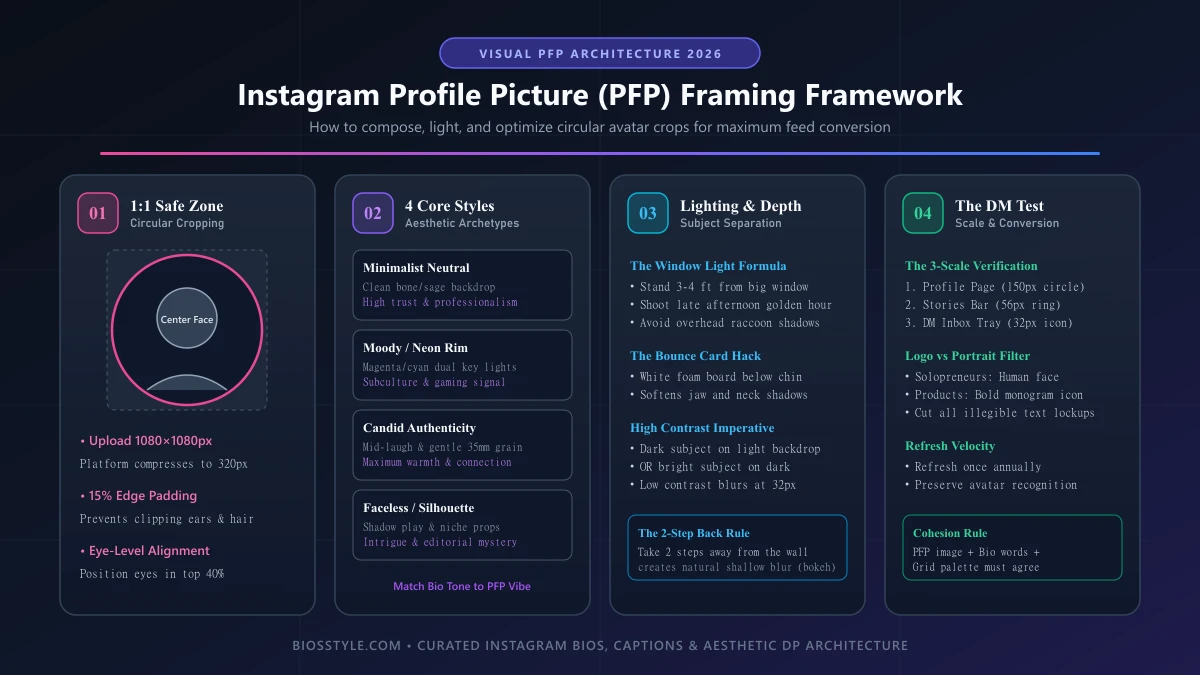
Your Instagram Display Picture (DP) represents your visual brand across comments, DMs, story rings, and search results. While Instagram displays profile pictures at 110 × 110 pixels on mobile, uploading at that resolution produces severe pixelation.
Always upload your profile picture at 320 × 320 pixels or 800 × 800 pixels in high-quality PNG or WebP format. Because Instagram automatically crops your square image into a circle, corners are discarded entirely.
Leave at least 15% padding around your face, logo, or subject to avoid awkward head crops. Need inspiration for a captivating profile visual? Explore our curated Instagram DP directory and Aesthetic DP for Girls.
5. Video & Reels Upload Specs: Bitrates, Codecs & Compression Prevention
Nothing ruins a crisp 4K Reel faster than Instagram's aggressive compression algorithm. To prevent your videos from turning blurry upon upload, you must deliver files that match Instagram's preferred encoding pipeline.
Recommended Video Specs:
• Container: MP4 or MOV • Video Codec: H.264 (avoids transcoding degradation) • Audio Codec: AAC at 128 kbps or higher, 44.1 kHz • Frame Rate: 30 fps or 60 fps (do not upload 24 fps cinematic without testing smoothness) • Recommended Resolution: 1080 × 1920 px (Instagram downscales 4K videos heavily, often causing compression artifacts; exporting at 1080p produces sharper results).
Ensure this setting is enabled: In the Instagram app, go to Profile > Settings > Account > Data Usage and Media Quality > Toggle ON 'Upload at highest quality'. This prevents Instagram from reducing quality over cellular networks.
6. Instagrammable Fonts & Typography Sizing for Bios & Stories
Pairing correct pixel dimensions with stylish typography creates a cohesive visual identity. Whether generating stylized fonts for your bio or overlaying text on Story photos, typographic scale is vital.
For Story graphics, ensure headline text is at least 60–80 pt so it remains instantly readable on smaller mobile displays. For your bio and username identity, use our AI Instagram Bio Generator to generate Unicode fonts that look clean without exceeding line limits.
Complete your profile identity with aesthetic username ideas from our Unique Instagram Usernames and Aesthetic Usernames collections.